


Offers

Give discounts to shoppers, not coupon sites.

Issue one-use codes through a spin-to-win wheel. Decide who can use every discount code in your store. Measure real revenue from orders that actually used your code.

Free forever up to 25,000 sessions a month. Every Pro feature free for your first 14 days. No card.

One spin per shopper. Real odds.

Run a spin-to-win wheel shoppers can trust. Place it inline, in a slide-in or in a lightbox. Our servers draw the winner, not the browser. Prize codes never sit in your page source.

  • Four looks: Classic in your store colours, Glass, Carnival and Midnight.
  • Each slice is drawn to its real prize odds, and shoppers can open the odds.
  • Reloading shows the same prize. Waits for cookie consent and respects reduced motion.
One winner. One code. One use.

Shared codes end up on coupon sites and extensions. Benson gives every winner a unique code that works once and expires on your schedule. Coupon sites have nothing reusable to list.

  • Pick the expiry window: 24 hours, 48 hours, 7 days or 30 days.
  • Created inside your store's own discounts and removed once used or expired.
  • Pause a campaign and codes already won keep working until they run out.
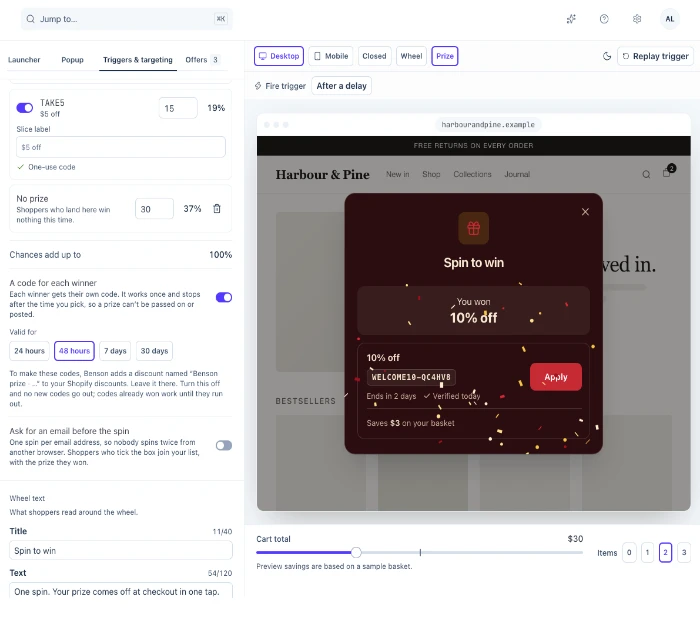
The campaign editor with A code for each winner switched on and Valid for set to 48 hours, beside the storefront preview of a winner's prize card showing their own one-use code and how long it has left.

Real subscribers. No fake emails.

Ask for an email before the spin without filling your list with junk. Throwaway addresses are turned away. Opted-in shoppers go to Klaviyo or Mailchimp with their prize, code and expiry for your flows.

  • One spin per address. Throwaway emails are refused, and +suffix tricks never buy a second.
  • The marketing tick box starts unticked. Leave it unticked and Benson keeps no address.
  • In Klaviyo, opted-in wins arrive as events to trigger your reminder flows.
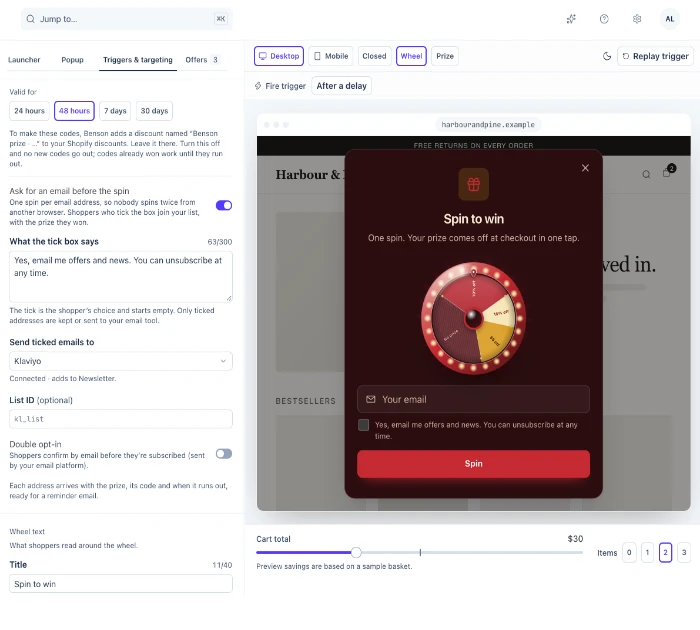
The campaign editor's Ask for an email before the spin section, with the tick box's words and Klaviyo picked for ticked emails, beside the wheel's preview with an email field and a tick box above the Spin button.

Count orders, not pop-up views.

Other apps take credit for every buyer who glanced at a pop-up. Benson counts an order only when the shopper used a code from that campaign. You see what a campaign actually made you and what it cost in discount.

  • Full funnel: views, opens, emails, opt-ins, spins, wins, codes applied and orders.
  • Step-by-step conversion rates, revenue, discount given, daily chart and prize breakdown.
  • Compare every campaign across the last 30 days on one summary screen.
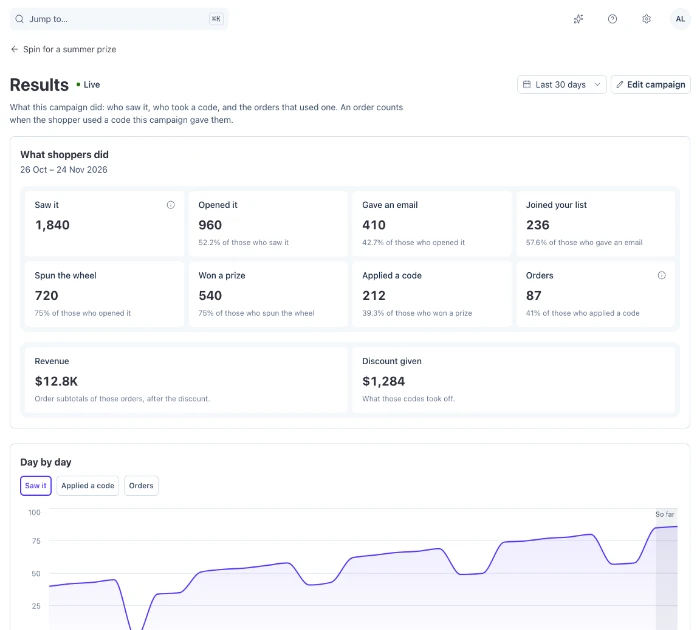
A spin-to-win campaign's Results page for the last 30 days: saw it, opened it, gave an email, joined the list, spun the wheel, won a prize, applied a code and orders, each with its share of the step before, then the revenue and the discount given.

Stop leaked codes at checkout.

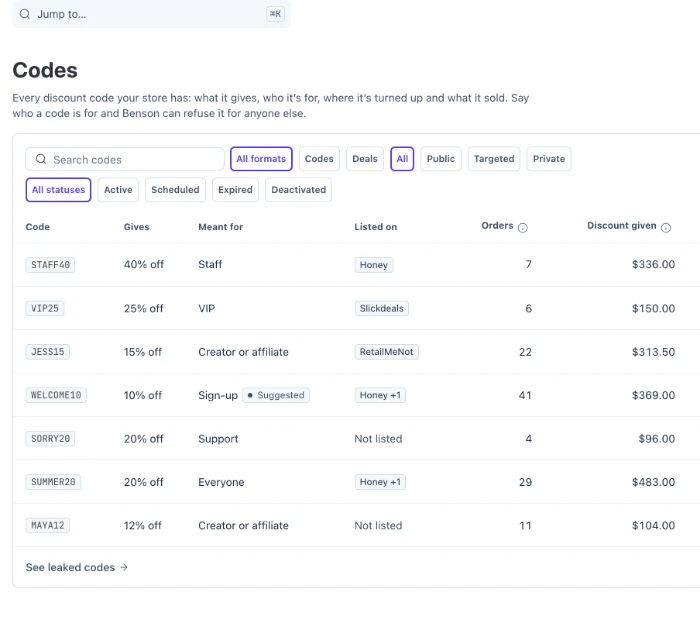
See every discount code in your store, where it leaked, and its 30-day orders and discount. Switch on Refuse at checkout to stop extensions and coupon sites applying it. The shoppers it was meant for use it as normal.

  • Tag each code for staff, VIPs, creators, sign-ups, support or everyone. Benson suggests one.
  • See which coupon sites and extensions list each code, plus its 30-day orders and discount.
  • Set Refuse at checkout before a code leaks to stop coupon sites, extensions and affiliates.
The Codes page: each discount code with what it gives, who it is meant for (staff, VIP, creator or affiliate, sign-up as Benson's suggestion, support, everyone), the coupon sites and extensions listing it, and its orders and discount given over 30 days.

Take your codes back. 14 days of Pro free, no card.

Questions

See what shopping agents are taking. Free forever, no card.

Free forever up to 25,000 sessions a month. Every Pro feature free for your first 14 days. No card. We'll email you about getting started. Unsubscribe any time.